Documentation Index
Fetch the complete documentation index at: https://wb-21fd5541-weave-caching.mintlify.app/llms.txt
Use this file to discover all available pages before exploring further.
Weave の Leaderboards を使用すると、複数のメトリクスにわたって複数の Models を評価・比較し、精度、生成の質、レイテンシ、またはカスタム評価ロジックを測定できます。Leaderboard を活用することで、モデルのパフォーマンスを中央の場所で可視化し、時間の経過に伴う変化を追跡し、チーム全体でベンチマークを共有できます。
Leaderboard は以下のような場合に最適です:
- モデルパフォーマンスの回帰(デグレード)の追跡
- 共有された評価ワークフローの調整
Leaderboard の作成は、Weave UI および Weave Python SDK でのみ利用可能です。TypeScript ユーザーは Weave UI を使用して Leaderboard を作成および管理できます。 Leaderboard の作成
Leaderboard は Weave UI または プログラム から作成できます。
UI を使用する場合
Weave UI で直接 Leaderboard を作成・カスタマイズするには:
- Weave UI で Leaders セクションに移動します。表示されていない場合は、More → Leaders をクリックします。
- + New Leaderboard をクリックします。
- Leaderboard Title フィールドに、分かりやすい名前(例:
summarization-benchmark-v1)を入力します。
- 任意で、この Leaderboard が何を比較するものか説明を追加します。
- 列を追加 して、表示する評価とメトリクスを定義します。
- レイアウトが完成したら、Leaderboard を保存して公開し、他のユーザーと共有します。
列を追加する
Leaderboard の各列は、特定の評価からのメトリクスを表します。列を設定するには、以下を指定します:
- Evaluation: ドロップダウンから評価 run を選択します(事前に作成されている必要があります)。
- Scorer: その評価で使用されたスコアリング関数(例:
jaccard_similarity, simple_accuracy)を選択します。
- Metric: 表示する集計メトリクスを選択します(例:
mean, true_fraction など)。
さらに列を追加するには、Add Column をクリックします。
列を編集するには、右側の 3 つのドットメニュー (⋯) をクリックします。以下の操作が可能です:
- Move before / after – 列の順序を入れ替える
- Duplicate – 列の定義をコピーする
- Delete – 列を削除する
- Sort ascending – Leaderboard のデフォルトのソート順を設定する(再度クリックすると降順に切り替わります)
Python
Leaderboard を作成して公開するには:
-
テスト用の Datasets を定義します。組み込みの
Dataset を使用するか、入力とターゲットのリストを手動で定義できます。
dataset = [
    {"input": "...", "target": "..."},
    ...
]
-
1 つ以上の scorers を定義します。
@weave.op
def jaccard_similarity(target: str, output: str) -> float:
    ...
-
Evaluation を作成します。
evaluation = weave.Evaluation(
    name="My Eval",
    dataset=dataset,
    scorers=[jaccard_similarity],
)
-
評価対象の Models を定義します。
@weave.op
def my_model(input: str) -> str:
    ...
-
評価を実行します。
 async def run_all():
     await evaluation.evaluate(model_vanilla)
     await evaluation.evaluate(model_humanlike)
     await evaluation.evaluate(model_messy)

asyncio.run(run_all())
-
Leaderboard を作成します。
spec = leaderboard.Leaderboard(
    name="My Leaderboard",
    description="Evaluating models on X task",
    columns=[
        leaderboard.LeaderboardColumn(
            evaluation_object_ref=get_ref(evaluation).uri(),
            scorer_name="jaccard_similarity",
            summary_metric_path="mean",
        )
    ]
)
-
Leaderboard を公開します。
-
結果を取得します。
results = leaderboard.get_leaderboard_results(spec, client)
print(results)
エンドツーエンドの Python 例
次の例では、Weave Evaluations を使用し、共通のデータセット上で 3 つの要約モデルをカスタムメトリクスを用いて比較する Leaderboard を作成します。小さなベンチマークを作成し、各モデルを評価し、Jaccard 類似度 で各モデルをスコアリングし、その結果を Weave Leaderboard に公開します。
import weave
from weave.flow import leaderboard
from weave.trace.ref_util import get_ref
import asyncio

# プロジェクトの初期化
client = weave.init("leaderboard-demo")

# データセットの定義
dataset = [
    {
        "input": "Weave is a tool for building interactive LLM apps. It offers observability, trace inspection, and versioning.",
        "target": "Weave helps developers build and observe LLM applications."
    },
    {
        "input": "The OpenAI GPT-4o model can process text, audio, and vision inputs, making it a multimodal powerhouse.",
        "target": "GPT-4o is a multimodal model for text, audio, and images."
    },
    {
        "input": "The W&B team recently added native support for agents and evaluations in Weave.",
        "target": "W&B added agents and evals to Weave."
    }
]

# スコアラーの定義
@weave.op
def jaccard_similarity(target: str, output: str) -> float:
    target_tokens = set(target.lower().split())
    output_tokens = set(output.lower().split())
    intersection = len(target_tokens & output_tokens)
    union = len(target_tokens | output_tokens)
    return intersection / union if union else 0.0

# 評価の定義
evaluation = weave.Evaluation(
    name="Summarization Quality",
    dataset=dataset,
    scorers=[jaccard_similarity],
)

# 評価対象モデルの定義
@weave.op
def model_vanilla(input: str) -> str:
    return input[:50]

@weave.op
def model_humanlike(input: str) -> str:
    if "Weave" in input:
        return "Weave helps developers build and observe LLM applications."
    elif "GPT-4o" in input:
        return "GPT-4o supports text, audio, and vision input."
    else:
        return "W&B added agent support to Weave."

@weave.op
def model_messy(input: str) -> str:
    return "Summarizer summarize models model input text LLMs."

# 全モデルの評価実行
async def run_all():
    await evaluation.evaluate(model_vanilla)
    await evaluation.evaluate(model_humanlike)
    await evaluation.evaluate(model_messy)

asyncio.run(run_all())

# Leaderboard スペックの定義
spec = leaderboard.Leaderboard(
    name="Summarization Model Comparison",
    description="Evaluate summarizer models using Jaccard similarity on 3 short samples.",
    columns=[
        leaderboard.LeaderboardColumn(
            evaluation_object_ref=get_ref(evaluation).uri(),
            scorer_name="jaccard_similarity",
            summary_metric_path="mean",
        )
    ]
)

# Leaderboard の公開
weave.publish(spec)

# 結果の取得と表示
results = leaderboard.get_leaderboard_results(spec, client)
print(results)
Leaderboard の表示と解釈
スクリプトの実行が完了したら、Leaderboard を確認します:
- Weave UI で Leaders タブに移動します。表示されていない場合は More をクリックし、Leaders を選択します。
- 作成した Leaderboard の名前(例:
Summarization Model Comparison)をクリックします。
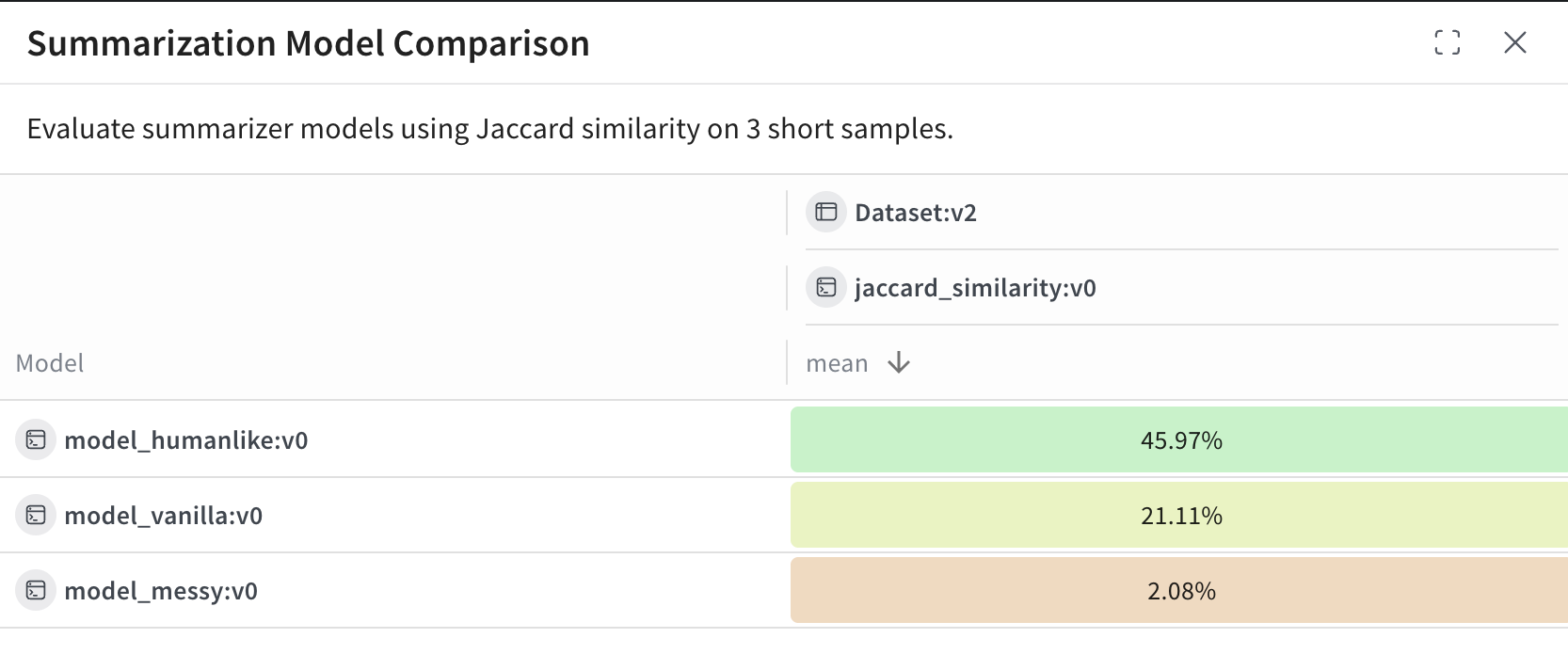
Leaderboard のテーブルでは、各行が特定のモデル(model_humanlike, model_vanilla, model_messy)を表します。mean 列は、モデルの出力と参照用要約との間の平均 Jaccard 類似度を示しています。
この例の結果:
model_humanlike が最も優れており、約 46% の重複があります。model_vanilla(単純な切り捨て)は約 21% です。- 意図的に質の低くした
model_messy は、約 2% のスコアとなります。


 Platform
 W&B Models
 W&B Weave
 W&B Inference
 W&B Training
 Release Notes