Documentation Index
Fetch the complete documentation index at: https://wb-21fd5541-weave-caching.mintlify.app/llms.txt
Use this file to discover all available pages before exploring further.
코드에 트레이싱(tracing) 기능을 추가하여 Weave로 LLM 호출을 추적하는 방법을 알아보세요. 이 퀵스타트 가이드는 OpenAI에 대한 요청을 추적하고 Weave UI에서 결과를 확인하는 과정을 안내합니다.
학습 내용:
이 가이드에서는 다음 내용을 다룹니다:
- 코드에서 Weave 임포트 및 설정하기
weave.op 데코레이터를 사용하여 코드 추적하기- Weave UI에서 트레이스(traces) 확인하기
Prerequisites
- A W&B account
- Python 3.8+ or Node.js 18+
- Required packages installed:
- Python:
pip install weave openai
- TypeScript:
npm install weave openai
- An OpenAI API key set as an environment variable
새 프로젝트에 트레이스 로그 기록하기
코드를 추적하고 Weave에 트레이스를 로그로 기록하려면 다음 단계를 따르세요:
- 코드에
weave 라이브러리를 임포트합니다.
- 코드에서
weave.init('your_wb_team/project_name')을 호출하여 추적 정보를 W&B Teams 및 Projects로 전송합니다. 팀을 설정하지 않으면 트레이스는 사용자의 기본 팀으로 전송됩니다. 지정된 Projects가 팀 내에 존재하지 않는 경우, Weave가 이를 새로 생성합니다.
- 추적하려는 특정 함수에
@weave.op() 데코레이터를 추가합니다. Weave는 지원되는 LLM에 대한 호출을 자동으로 추적하지만, Weave 데코레이터를 추가하면 특정 함수의 입력, 출력 및 코드를 개별적으로 추적할 수 있습니다. TypeScript에서는 weave.op(your_function) 형식을 사용합니다.
다음 예제 코드는 OpenAI에 요청을 보내고( OpenAI API 키 필요), Weave는 해당 요청의 트레이싱 정보를 기록합니다. 이 요청은 OpenAI 모델에게 입력값에서 공룡 이름을 추출하고 각 공룡의 식성(초식 또는 육식)을 식별하도록 요청합니다.
다음 예제 코드를 실행하여 Weave로 첫 번째 프로젝트를 추적해 보세요:
# Weave 라이브러리를 임포트합니다
import weave
from openai import OpenAI

client = OpenAI()

# Weave는 이 함수의 입력, 출력 및 코드를 자동으로 추적합니다
@weave.op()
def extract_dinos(sentence: str) -> dict:
    response = client.chat.completions.create(
        model="gpt-4o",
        messages=[
            {
                "role": "system",
                "content": """In JSON format extract a list of `dinosaurs`, with their `name`,
their `common_name`, and whether its `diet` is a herbivore or carnivore"""
            },
            {
                "role": "user",
                "content": sentence
            }
            ],
            response_format={ "type": "json_object" }
        )
    return response.choices[0].message.content

# Weave를 초기화하고, 데이터를 로그할 팀과 프로젝트를 설정합니다
weave.init('your-team/traces-quickstart')

sentence = """I watched as a Tyrannosaurus rex (T. rex) chased after a Triceratops (Trike), \
both carnivore and herbivore locked in an ancient dance. Meanwhile, a gentle giant \
Brachiosaurus (Brachi) calmly munched on treetops, blissfully unaware of the chaos below."""

result = extract_dinos(sentence)
print(result)
// Weave 라이브러리를 임포트합니다
import * as weave from 'weave';
import OpenAI from 'openai';

const openai = new OpenAI();

// Weave는 이 함수의 입력, 출력 및 코드를 자동으로 추적합니다
async function extractDinos(input: string) {
  const response = await openai.chat.completions.create({
    model: 'gpt-4o',
    messages: [
      {
        role: 'user',
        content: `In JSON format extract a list of 'dinosaurs', with their 'name', their 'common_name', and whether its 'diet' is a herbivore or carnivore: ${input}`,
      },
    ],
  });
  return response.choices[0].message.content;
}
const extractDinosOp = weave.op(extractDinos);

async function main() {

  // Weave를 초기화하고, 데이터를 로그할 팀과 프로젝트를 설정합니다
  await weave.init('your-team/traces-quickstart');

  const result = await extractDinosOp(
    'I watched as a Tyrannosaurus rex (T. rex) chased after a Triceratops (Trike), both carnivore and herbivore locked in an ancient dance. Meanwhile, a gentle giant Brachiosaurus (Brachi) calmly munched on treetops, blissfully unaware of the chaos below.'
  );
  console.log(result);
}

main();
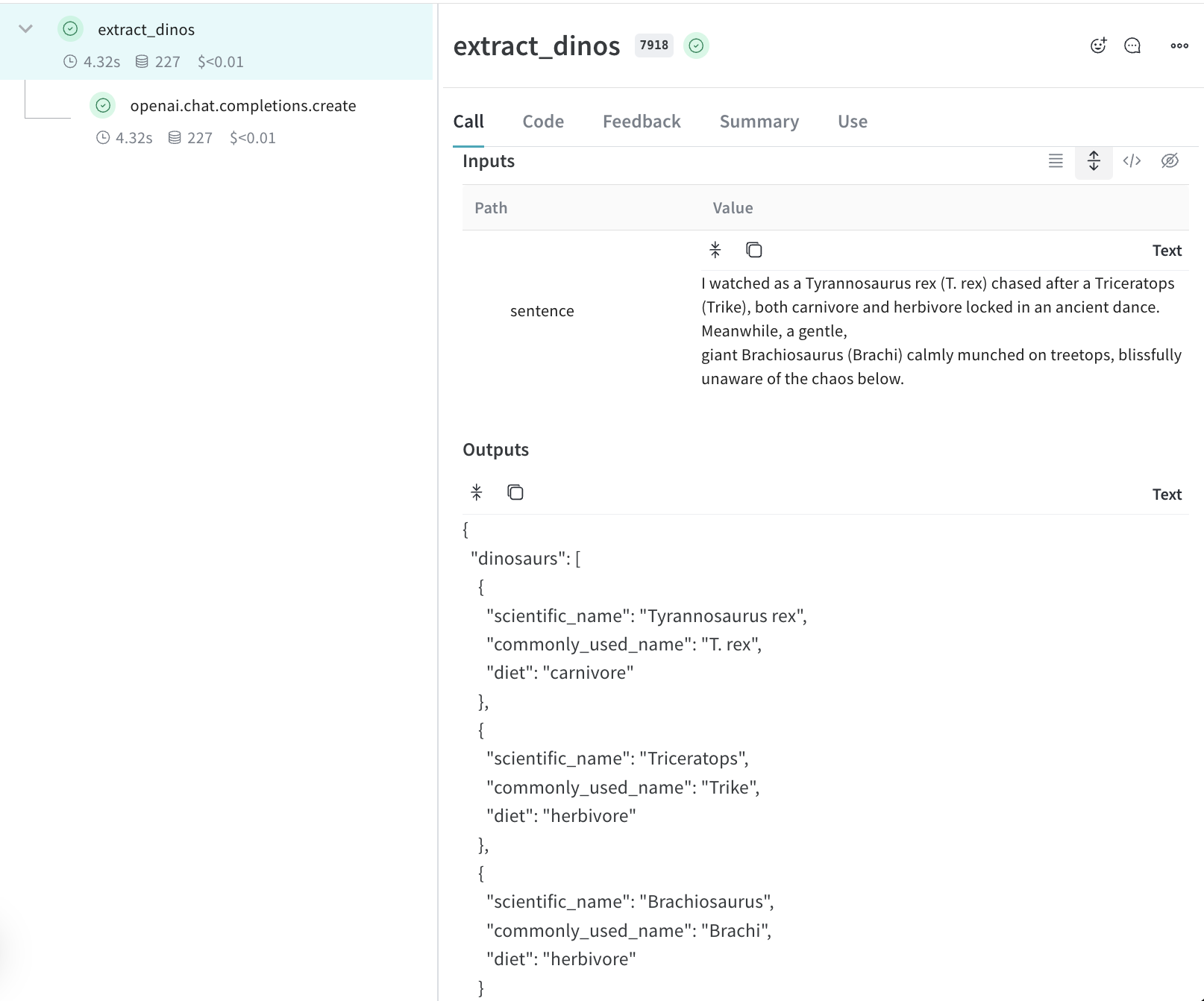
extract_dinos 함수를 호출하면, Weave는 터미널에 트레이스를 확인할 수 있는 링크를 출력합니다. 출력 결과는 다음과 같습니다:
weave:  $ pip install weave --upgrade
weave: Logged in as Weights & Biases user: example-username.
weave: View Weave data at https://wandb.ai/your-team/traces-quickstart/weave
weave: 🍩 https://wandb.ai/your-team/traces-quickstart/r/call/019ae171-7f32-7c96-8b42-931a32f900b7
{
  "dinosaurs": [
    {
      "name": "Tyrannosaurus rex",
      "common_name": "T. rex",
      "diet": "carnivore"
    },
    {
      "name": "Triceratops",
      "common_name": "Trike",
      "diet": "herbivore"
    },
    {
      "name": "Brachiosaurus",
      "common_name": "Brachi",
      "diet": "herbivore"
    }
  ]
}
프로젝트에서 애플리케이션의 트레이스 확인하기
터미널의 링크를 클릭하거나 브라우저에 붙여넣어 Weave UI를 엽니다. Weave UI의 Traces 패널에서 각 트레이스를 클릭하여 입력, 출력, 지연 시간(latency), 토큰 사용량과 같은 데이터를 확인할 수 있습니다.
Traces에 대해 더 알아보기
- 함수 데코레이션 및 호출 정보 검색 방법에 대해 알아보세요.
- Playground를 사용하여 로그된 트레이스에서 다양한 모델을 테스트해 보세요.
- 인테그레이션 살펴보기. Weave는 OpenAI, Anthropic 등 수많은 LLM 라이브러리에 대한 호출을 자동으로 추적합니다. 사용 중인 LLM 라이브러리가 현재 인테그레이션 목록에 없더라도,
@weave.op()로 감싸면 다른 LLM 라이브러리나 프레임워크의 호출을 쉽게 추적할 수 있습니다.
다음 단계
애플리케이션 평가 시작하기를 진행한 후, RAG 애플리케이션 평가 방법을 확인해 보세요.

 Platform
 W&B Models
 W&B Weave
 W&B Inference
 W&B Training
 Release Notes