

 Platform
 W&B Models
 W&B Weave
 W&B Inference
 W&B Training
 Release Notes
Annotation queues provide a focused review interface for domain experts. You review one item at a time, examine the provided context, and submit structured feedback using predefined fields. You do not need to understand the underlying model or tracing system to complete reviews. This allows external experts to review the data only without needing larger project awareness.Documentation Index
Fetch the complete documentation index at: https://wb-21fd5541-weave-caching.mintlify.app/llms.txt
Use this file to discover all available pages before exploring further.
Annotation workflow
As an annotator, your task consists of reviewing the accuracy of the LLM responses. Your feedback is saved as annotations to the data. To review an annotation queue:- Open the shared annotation queue using a queue link provided by your team.
- Review each item. You can move forward and backward through items in the queue at any time.
- Submit an annotation using the provided annotation fields.
Review a queue item
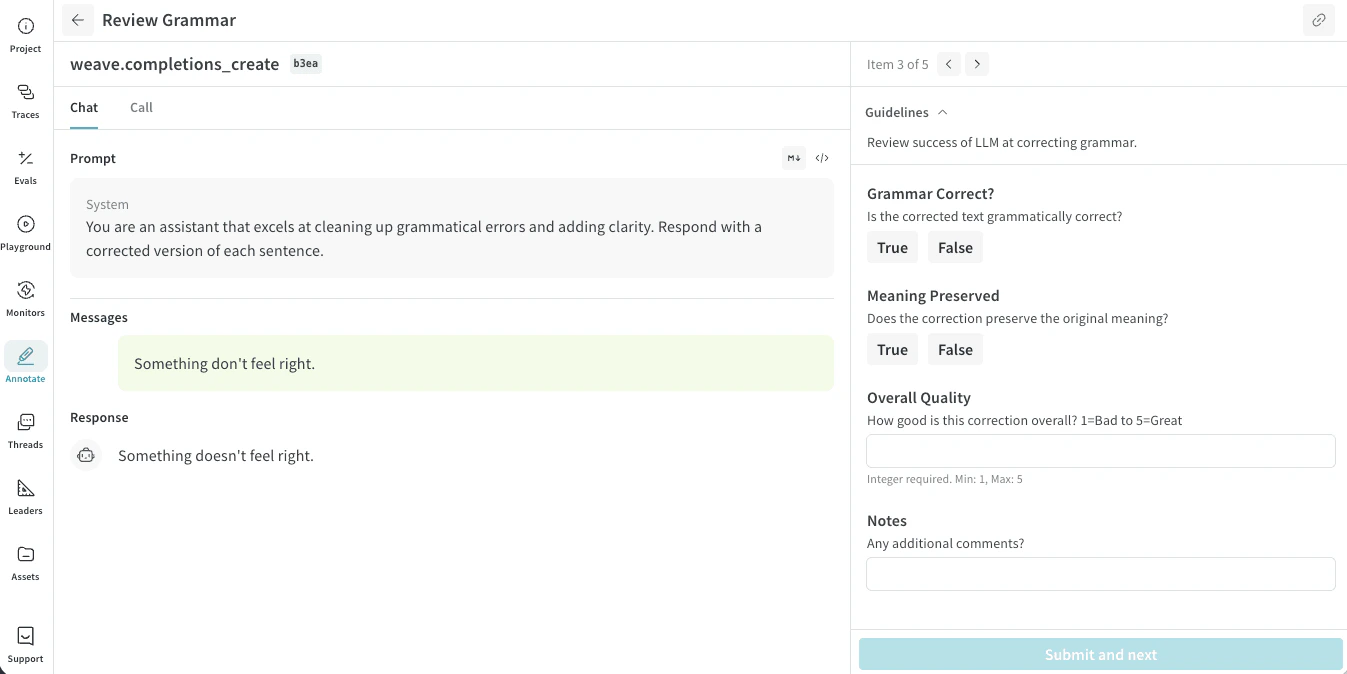
For each item, the review interface shows two panes:- A trace pane showing selected input context (such as prompts, documents, or images) and the corresponding model response or decision.
- An item pane containing an annotation entry form containing annotation fields.
If you submit feedback for an item that someone else has already reviewed, your feedback is stored in addition to the original annotator’s feedback.