Documentation Index
Fetch the complete documentation index at: https://wb-21fd5541-weave-caching.mintlify.app/llms.txt
Use this file to discover all available pages before exploring further.
프롬프트를 생성하고, 평가하고, 개선하는 과정은 AI 엔지니어의 핵심 활동입니다.
프롬프트의 작은 변화가 애플리케이션의 행동에 큰 영향을 미칠 수 있습니다.
W&B Weave를 사용하면 프롬프트를 생성하고, 저장 및 검색하며, 시간이 지남에 따라 발전시킬 수 있습니다.
Weave는 프롬프트의 구성 방식에 대해 제약을 두지 않습니다. 요구 사항이 간단하다면 내장된 weave.StringPrompt 또는 weave.MessagesPrompt 클래스를 사용할 수 있습니다. 더 복잡한 요구 사항이 있는 경우, 해당 클래스나 기본 클래스인 weave.Prompt를 상속받아 format 메소드를 오버라이드할 수 있습니다.
weave.publish를 사용하여 이러한 오브젝트 중 하나를 게시하면, Weave 프로젝트의 Prompts 페이지에 표시됩니다.
StringPrompt
StringPrompt는 시스템 메시지, 사용자 쿼리 또는 LLM에 대한 독립형 텍스트 입력에 사용할 수 있는 단일 문자열 프롬프트를 로그합니다. 여러 메시지가 오가는 대화의 복잡성이 필요하지 않은 개별 프롬프트 문자열을 관리할 때는 StringPrompt를 사용하는 것이 좋습니다.
import weave
weave.init('intro-example')

# 해적처럼 말하는 시스템 프롬프트 생성
system_prompt = weave.StringPrompt("You speak like a pirate")
# pirate_prompt라는 이름으로 게시
weave.publish(system_prompt, name="pirate_prompt")

from openai import OpenAI
client = OpenAI()

response = client.chat.completions.create(
  model="gpt-4o",
  messages=[
    {
      "role": "system",
      "content": system_prompt.format()
    },
    {
      "role": "user",
      "content": "Explain general relativity in one paragraph."
    }
  ],
)
import * as weave from 'weave';
import OpenAI from 'openai';

async function main() {
  // weave.init은 클라이언트 인스턴스를 반환합니다
  const weaveClient = await weave.init('wandb/prompt-examples');

  const systemPrompt = new weave.StringPrompt({
    content: 'You speak like a pirate',
    name: 'your-prompt',
    description: 'A helpful description of your prompt',
  });

  // init에서 반환된 클라이언트를 사용합니다
  await weaveClient.publish(systemPrompt, 'pirate_prompt');

  // Weave에서 호출을 추적하기 위해 OpenAI 클라이언트를 래핑합니다
  const client = weave.wrapOpenAI(new OpenAI());

  const response = await client.chat.completions.create({
    model: "gpt-4o",
    messages: [
      {
        role: "system",
        content: systemPrompt.content
      },
      {
        role: "user",
        content: "Explain general relativity in one paragraph."
      }
    ],
  });
}

main();
MessagesPrompt
MessagesPrompt를 사용하면 멀티턴 대화와 채팅 기반 프롬프트를 로그할 수 있습니다. 이는 전체 대화 흐름을 나타내는 메시지 오브젝트 배열(“system”, “user”, “assistant”와 같은 역할 포함)을 저장합니다. 여러 메시지에 걸쳐 컨텍스트를 유지하거나, 특정 대화 패턴을 정의하거나, 재사용 가능한 대화 템플릿을 만들어야 하는 채팅 기반 LLM의 경우 이 방식을 권장합니다.
import weave
weave.init('intro-example')

# 대화형 프롬프트 정의
prompt = weave.MessagesPrompt([
    {
        "role": "system",
        "content": "You are a stegosaurus, but don't be too obvious about it."
    },
    {
        "role": "user",
        "content": "What's good to eat around here?"
    }
])
weave.publish(prompt, name="dino_prompt")

from openai import OpenAI
client = OpenAI()

response = client.chat.completions.create(
  model="gpt-4o",
  # 프롬프트 포맷팅 적용
  messages=prompt.format(),
)
import * as weave from 'weave';
import OpenAI from 'openai';

async function main() {
  // weave.init은 클라이언트 인스턴스를 반환합니다
  const weaveClient = await weave.init('wandb/prompt-examples');

  const prompt = new weave.MessagesPrompt({
    messages: [
      {
        "role": "system",
        "content": "You are a stegosaurus, but don't be too obvious about it."
      },
      {
        "role": "user",
        "content": "What's good to eat around here?"
      }
    ],
  });

  // init에서 반환된 클라이언트를 사용합니다
  await weaveClient.publish(prompt, 'dino_prompt');

  // Weave에서 호출을 추적하기 위해 OpenAI 클라이언트를 래핑합니다
  const client = weave.wrapOpenAI(new OpenAI());

  const response = await client.chat.completions.create({
    model: "gpt-4o",
    messages: prompt.messages,
  });
}

main();
파라미터화된 프롬프트 (Parameterizing prompts)
StringPrompt와 MessagesPrompt 모두 파라미터화를 통한 동적 콘텐츠를 지원합니다. 이를 통해 런타임에 다른 값으로 채울 수 있는 플레이스홀더({variable} 구문 사용)가 포함된 유연하고 재사용 가능한 프롬프트 템플릿을 만들 수 있습니다. 이는 일관된 구조를 유지하면서 다양한 입력, 사용자 데이터 또는 컨텍스트에 프롬프트를 적응시켜야 하는 확장 가능한 애플리케이션을 빌드할 때 유용합니다. format() 메소드는 이러한 플레이스홀더를 실제 값으로 바꾸기 위해 키-값 쌍을 인자로 받습니다.
import weave
weave.init('intro-example')

# 변수가 포함된 프롬프트 정의
prompt = weave.StringPrompt("Solve the equation {equation}")
weave.publish(prompt, name="calculator_prompt")

from openai import OpenAI
client = OpenAI()

response = client.chat.completions.create(
  model="gpt-4o",
  messages=[
    {
      "role": "user",
      "content": prompt.format(equation="1 + 1 = ?")
    }
  ],
)
import * as weave from 'weave';
import OpenAI from 'openai';

async function main() {
  // weave.init은 클라이언트 인스턴스를 반환합니다
  const weaveClient = await weave.init('wandb/prompt-examples');

  const prompt = new weave.StringPrompt({
    content: 'Solve the equation {equation}',
  });

  // init에서 반환된 클라이언트를 사용합니다
  await weaveClient.publish(prompt, 'calculator_prompt');

  // Weave에서 호출을 추적하기 위해 OpenAI 클라이언트를 래핑합니다
  const client = weave.wrapOpenAI(new OpenAI());

  const response = await client.chat.completions.create({
    model: "gpt-4o",
    messages: [
      {
        role: "user",
        content: prompt.format({ equation: "1 + 1 = ?" })
      }
    ],
  });
}

main();
MessagesPrompt에서도 작동합니다.
import weave
weave.init('intro-example')

prompt = weave.MessagesPrompt([
{
    "role": "system",
    "content": "You will be provided with a description of a scene and your task is to provide a single word that best describes an associated emotion."
},
{
    "role": "user",
    "content": "{scene}"
}
])
weave.publish(prompt, name="emotion_prompt")

from openai import OpenAI
client = OpenAI()

response = client.chat.completions.create(
  model="gpt-4o",
  messages=prompt.format(scene="A dog is lying on a dock next to a fisherman."),
)
import * as weave from 'weave';
import OpenAI from 'openai';

async function main() {
  // weave.init은 클라이언트 인스턴스를 반환합니다
  const weaveClient = await weave.init('wandb/prompt-examples');

  const prompt = new weave.MessagesPrompt({
    messages: [
      {
        "role": "system",
        "content": "You will be provided with a description of a scene and your task is to provide a single word that best describes an associated emotion."
      },
      {
        "role": "user",
        "content": "{scene}"
      }
    ]
  });

  // init에서 반환된 클라이언트를 사용합니다
  await weaveClient.publish(prompt, 'emotion_prompt');

  // Weave에서 호출을 추적하기 위해 OpenAI 클라이언트를 래핑합니다
  const client = weave.wrapOpenAI(new OpenAI());

  const response = await client.chat.completions.create({
    model: "gpt-4o",
    messages: prompt.format({ scene: "A dog is lying on a dock next to a fisherman." }),
  });
}

main();
프롬프트 버전 확인 및 비교
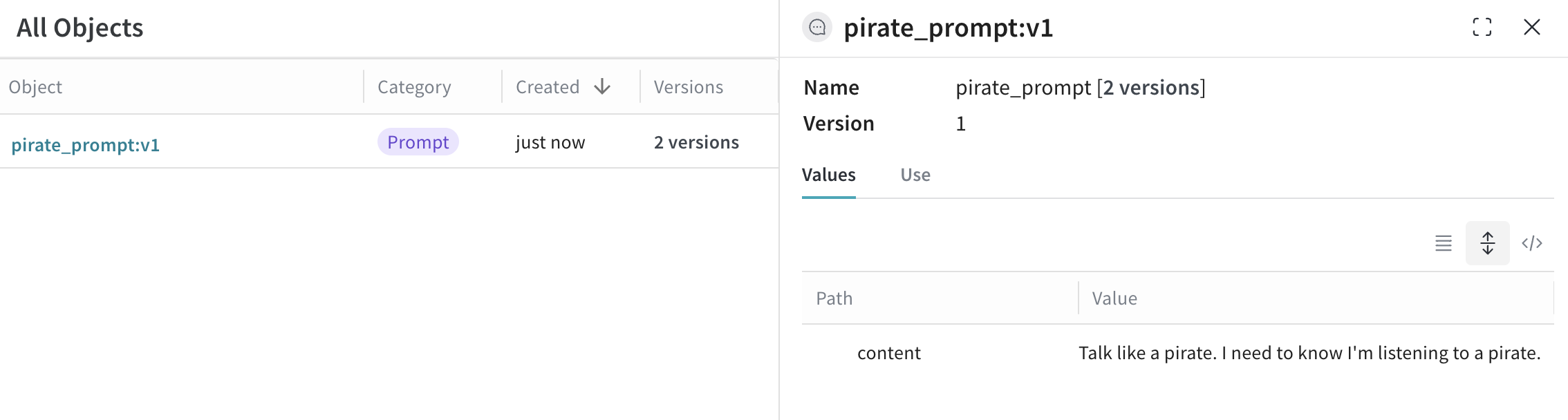
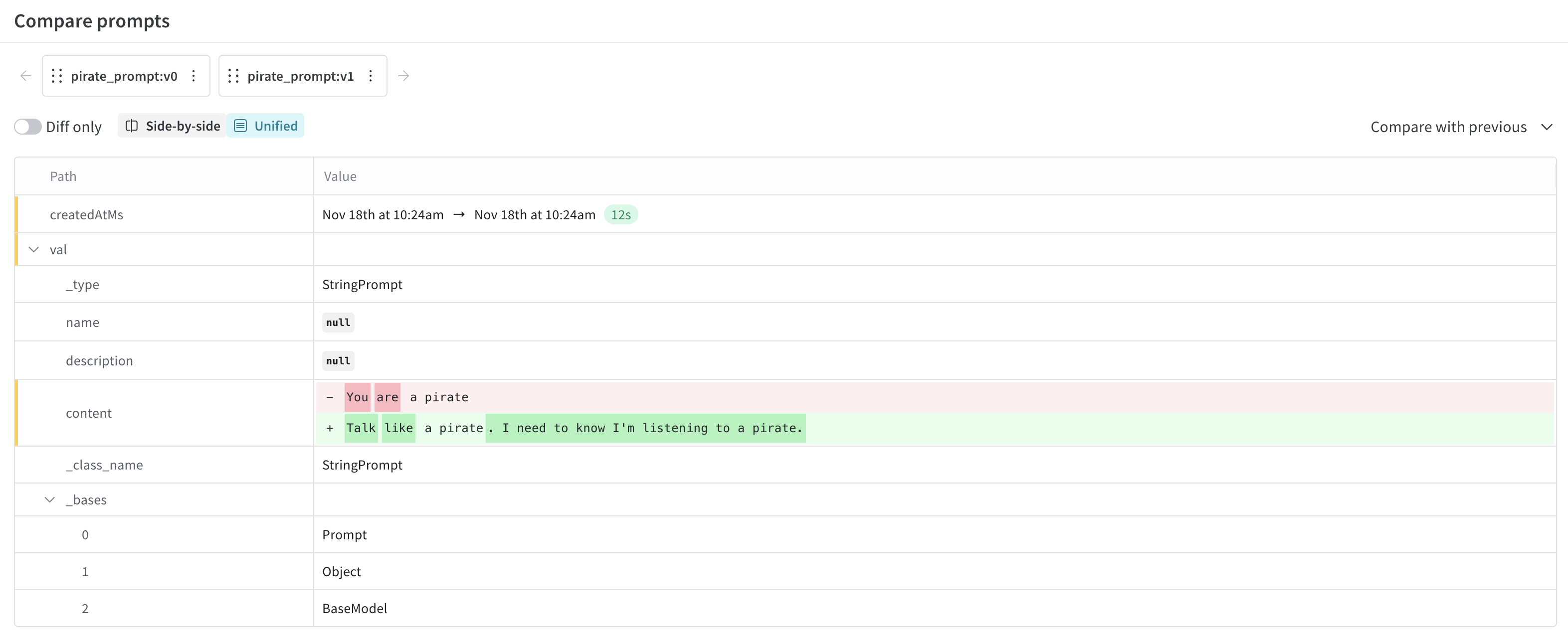
Weave는 프롬프트의 모든 버전을 자동으로 추적하여 프롬프트가 어떻게 발전해 왔는지에 대한 전체 이력을 생성합니다. 이 버전 관리 시스템은 프롬프트 엔지니어링 워크플로우에 매우 중요하며, 안전하게 실험하고 어떤 변화가 성능을 개선하거나 저하시켰는지 추적하고 필요할 때 이전 버전으로 쉽게 롤백할 수 있게 해줍니다. 동일한 이름으로 다른 내용의 프롬프트를 게시할 때마다 Weave는 이전 버전을 모두 보존하면서 새 버전을 생성합니다.
UI에서 프롬프트 버전을 확인하려면 다음 단계를 따르세요.
- UI에서 프로젝트를 열고 왼쪽 메뉴에서 Assets 버튼을 클릭합니다. Assets 페이지가 열립니다.
- Assets 페이지에서 Prompts를 클릭합니다. 프로젝트의 프롬프트가 나열된 Prompts 페이지가 열립니다.
- Versions 열에서 확인하려는 프롬프트의 (x) Versions를 클릭합니다. 프롬프트 버전 목록이 열립니다.
- (선택 사항) 목록에 있는 프롬프트 옆의 체크박스를 클릭한 다음 Compare 버튼을 클릭하여 프롬프트 버전을 비교할 수 있습니다. 이를 통해 프롬프트 간의 차이점(diff)을 확인할 수 있습니다.


 Platform
 W&B Models
 W&B Weave
 W&B Inference
 W&B Training
 Release Notes