Documentation Index
Fetch the complete documentation index at: https://wb-21fd5541-weave-caching.mintlify.app/llms.txt
Use this file to discover all available pages before exploring further.
Weave 는 Amazon Bedrock을 통해 이루어지는 LLM 호출을 자동으로 추적하고 로그를 남깁니다. Amazon Bedrock은 선도적인 AI 기업의 파운데이션 모델을 통합 API를 통해 제공하는 AWS의 완전 관리형 서비스입니다.
Amazon Bedrock에서 Weave 로 LLM 호출을 로그하는 방법에는 여러 가지가 있습니다. weave.op를 사용하여 Bedrock 모델에 대한 모든 호출을 추적하기 위한 재사용 가능한 오퍼레이션을 생성할 수 있습니다. 또한 Anthropic 모델을 사용하는 경우, Anthropic을 위한 Weave 의 내장 인테그레이션을 선택적으로 사용할 수 있습니다.
Traces
Weave 는 Bedrock API 호출에 대한 trace를 자동으로 캡처합니다. Weave 를 초기화하고 클라이언트를 패치한 후 평소와 같이 Bedrock 클라이언트를 사용할 수 있습니다.
import weave
import boto3
import json
from weave.integrations.bedrock.bedrock_sdk import patch_client

weave.init("my_bedrock_app")

# Bedrock 클라이언트 생성 및 패치
client = boto3.client("bedrock-runtime")
patch_client(client)

# 평소와 같이 클라이언트 사용
response = client.invoke_model(
    modelId="anthropic.claude-3-5-sonnet-20240620-v1:0",
    body=json.dumps({
        "anthropic_version": "bedrock-2023-05-31",
        "max_tokens": 100,
        "messages": [
            {"role": "user", "content": "What is the capital of France?"}
        ]
    }),
    contentType='application/json',
    accept='application/json'
)
response_dict = json.loads(response.get('body').read())
print(response_dict["content"][0]["text"])
converse API를 사용하는 방법은 다음과 같습니다:
messages = [{"role": "user", "content": [{"text": "What is the capital of France?"}]}]

response = client.converse(
    modelId="anthropic.claude-3-5-sonnet-20240620-v1:0",
    system=[{"text": "You are a helpful AI assistant."}],
    messages=messages,
    inferenceConfig={"maxTokens": 100},
)
print(response["output"]["message"]["content"][0]["text"])
사용자 정의 op로 래핑하기
@weave.op() 데코레이터를 사용하여 재사용 가능한 오퍼레이션을 생성할 수 있습니다. 다음은 invoke_model과 converse API를 모두 사용하는 예시입니다:
@weave.op
def call_model_invoke(
    model_id: str,
    prompt: str,
    max_tokens: int = 100,
    temperature: float = 0.7
) -> dict:
    body = json.dumps({
        "anthropic_version": "bedrock-2023-05-31",
        "max_tokens": max_tokens,
        "temperature": temperature,
        "messages": [
            {"role": "user", "content": prompt}
        ]
    })

    response = client.invoke_model(
        modelId=model_id,
        body=body,
        contentType='application/json',
        accept='application/json'
    )
    return json.loads(response.get('body').read())

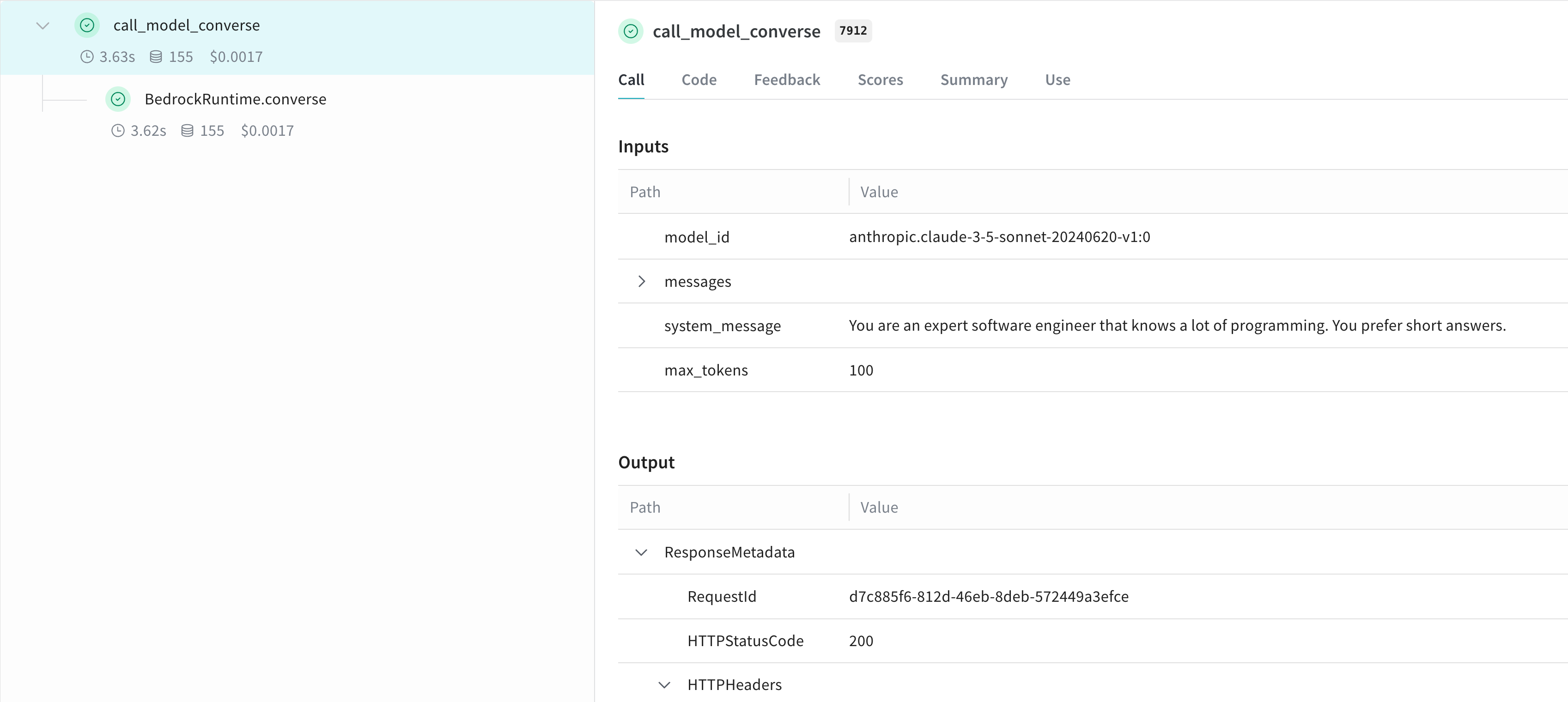
@weave.op
def call_model_converse(
    model_id: str,
    messages: str,
    system_message: str,
    max_tokens: int = 100,
) -> dict:
    response = client.converse(
        modelId=model_id,
        system=[{"text": system_message}],
        messages=messages,
        inferenceConfig={"maxTokens": max_tokens},
    )
    return response
더 쉬운 실험을 위한 Model 생성
실험을 더 잘 정리하고 파라미터를 캡처하기 위해 Weave Model 을 생성할 수 있습니다. 다음은 converse API를 사용하는 예시입니다:
class BedrockLLM(weave.Model):
    model_id: str
    max_tokens: int = 100
    system_message: str = "You are a helpful AI assistant."

    @weave.op
    def predict(self, prompt: str) -> str:
        "Bedrock의 converse API를 사용하여 응답 생성"

        messages = [{
            "role": "user",
            "content": [{"text": prompt}]
        }]

        response = client.converse(
            modelId=self.model_id,
            system=[{"text": self.system_message}],
            messages=messages,
            inferenceConfig={"maxTokens": self.max_tokens},
        )
        return response["output"]["message"]["content"][0]["text"]

# 모델 생성 및 사용
model = BedrockLLM(
    model_id="anthropic.claude-3-5-sonnet-20240620-v1:0",
    max_tokens=100,
    system_message="You are an expert software engineer that knows a lot of programming. You prefer short answers."
)
result = model.predict("What is the best way to handle errors in Python?")
print(result)
더 알아보기
Weave 와 함께 Amazon Bedrock을 사용하는 방법에 대해 더 알아보세요.
Weave Playground에서 Bedrock 시도해보기
별도의 설정 없이 Weave UI에서 Amazon Bedrock 모델을 실험해보고 싶으신가요? LLM Playground를 사용해 보세요.
Report: Weave를 사용한 Bedrock 기반 텍스트 요약 LLM 비교
Compare LLMs on Bedrock for text summarization with Weave 리포트에서는 Bedrock과 Weave 를 결합하여 요약 작업을 위한 LLM을 평가하고 비교하는 방법을 설명하며, 코드 샘플도 포함되어 있습니다.

 Platform
 W&B Models
 W&B Weave
 W&B Inference
 W&B Training
 Release Notes